
 مجدى
مجدى
1 Answer
 Colleen

Hover your mouse over the 'Account' drop down on the top Nav bar and click 'Settings'
Under the 'General'' tab, scroll to the “Cancel Account” section bottom of the page. Tagged users- click the “You may cancel your Tagged account at any time” link. Hi5 users- click the “You may cancel your hi5 account at any time” link
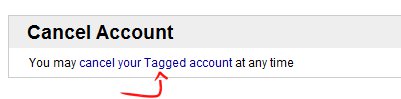
Select "Yes, I want to cancel my account" at the bottom of the page
| 13 years ago. Rating: 0 | |



Top contributors in Uncategorized category
Unanswered Questions
TG88
Answers: 0
Views: 4
Rating: 0
b29usorgg
Answers: 0
Views: 6
Rating: 0
exventocar
Answers: 0
Views: 11
Rating: 0
x8beer
Answers: 0
Views: 12
Rating: 0
Đoàn Hữu Tùng
Answers: 0
Views: 9
Rating: 0
Unlock Your Career Potential with CertsForce: The Ultimate Certification Training Platform
Answers: 0
Views: 10
Rating: 0
cho thue ao dai sai gon
Answers: 0
Views: 13
Rating: 0
tintuccaphe
> More questions...
Answers: 0
Views: 17
Rating: 0